
Auto Navigator New & Used Cars
Capital One Services, LLCAuto & Vehicles
4.8529.00 Reviews
- Version
- 2026.10.30
- Installs
- 100.00K
- Age Rating
- Mature 17+
Screenshots
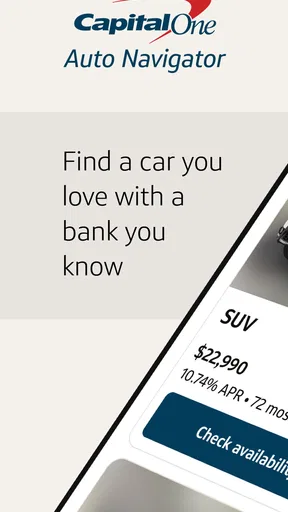
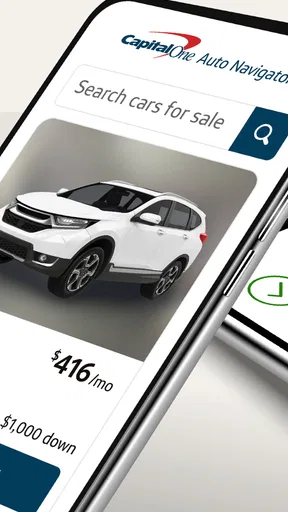

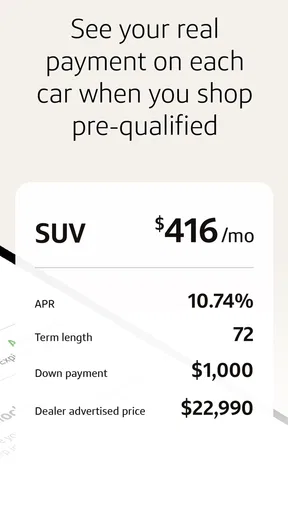

Our Review of Auto Navigator New & Used Cars
 Analysis by Appyee
Buying a car is rarely a one-person decision. Even when one person handles the search, another household member may compare the monthly cost, question the mileage, or simply want to see the same vehicle before anyone applies for financing. I found Auto Navigator New & Used Cars most useful in that shared decision-making stage: it brings car shopping and financing into the same place without pretending that choosing a vehicle is as simple as tapping a button.
Developed by Capital One Services, LLC, this free Auto & Vehicles app is designed around browsing new and used cars while viewing financing information. That combination gives it a clear purpose. It is not trying to replace every dealership, inspection service, or ownership calculator. Instead, it helps turn a vague search into a more organized conversation about which cars are worth considering and how the financing side may fit.
The app has a 4.7 average from around 6.1 thousand ratings, with more than 100 thousand installs. Those numbers suggest that it has found an audience among people who want a focused car-shopping tool rather than a general marketplace. Its Everyone age classification also makes sense for a household browsing on a shared phone or tablet, although the financial decisions involved still belong with the adults responsible for the purchase.
How Auto Navigator works when car shopping is a shared household task
A realistic use case is a couple searching after work. One person may know the preferred body style and safety priorities, while the other is more concerned about keeping the payment manageable. Instead of passing around screenshots from unrelated websites, you can use Auto Navigator to look through vehicle options and discuss the financing view alongside them. I like that workflow because it keeps the conversation attached to actual cars rather than an abstract budget.
That does not mean the app solves every disagreement. A vehicle that looks affordable in a financing view can still carry insurance, fuel, maintenance, registration, and inspection costs. I would use the app to narrow the field and prepare questions, not as the only source for deciding whether a particular car is financially sensible. The strongest result comes when the household treats the displayed financing information as a starting point for comparison.
For a shared device, the practical advantage is simple: the person who begins the search does not have to explain an entirely different website to everyone else. You can review a few candidates together, discard the ones that do not suit the household, and return to the more promising options later. That is especially helpful when one person is shopping for daily commuting while another is thinking about passengers, cargo, or occasional long trips.
The app is best viewed as a car-search workspace, not a complete ownership decision. That distinction matters. Its focus is the relationship between available vehicles and financing, while the broader ownership picture still requires independent checking. I would compare the vehicle details with the seller’s information, verify the condition in person, and consider a separate inspection before treating any listing as a serious purchase.
Starting the search without turning the household into one account
On a personal phone, I would begin by exploring the available car-shopping flow and seeing how naturally it fits my priorities. On a shared device, I would first agree on who is responsible for the account and who is only helping with research. That boundary is more important than it may sound. Browsing together is harmless; making a financing decision under the wrong person’s account can create confusion about whose information or application is involved.
I would not hand a child or casual guest the device and assume that the app’s Everyone rating makes every action appropriate for them. The age classification describes the app’s general suitability, not the maturity required to make a borrowing decision. A teenager can help compare passenger space or vehicle styles, but an adult should handle personal financial information, application steps, and any final commitment.
This is also where household privacy deserves attention. If several people use one phone, I would avoid leaving the device unlocked while a financing screen or personal account area is open. I would also make sure everyone understands whether they are merely browsing or moving into an action that could involve personal details. The app’s shared-use value comes from coordination, but coordination works only when account boundaries are clear.
One useful habit is to create a short household brief before searching. Write down the essential needs in ordinary language: daily distance, number of regular passengers, preferred vehicle type, and a payment range that the adults have already discussed. Then use the app to test whether the available cars fit those needs. This prevents the search from being driven entirely by attractive vehicles that look good individually but do not suit the household’s routine.
I also recommend agreeing on a stopping point. For example, everyone can choose a small group of candidates before opening financing details or contacting a seller. That keeps the app from becoming an endless stream of browsing and makes it easier to compare cars on consistent criteria. It is a small workflow improvement, but it makes a noticeable difference when several people have different priorities.
Keeping two or more decision-makers coordinated
Auto Navigator is more useful for a household when each person contributes a specific question. One person can check whether the vehicle type fits everyday use, another can examine the financing side, and a third can challenge the choice by asking what happens if fuel, repairs, or insurance cost more than expected. The app supplies a common place to begin, but the quality of the decision comes from how the household uses it.
I would avoid relying on memory after a group browsing session. Keep a simple shortlist outside the app with the vehicle name, the reason it made the list, and the concern that still needs checking. That is not a missing app feature; it is a sensible companion process. It helps prevent the most recently viewed car from winning merely because it is fresh in everyone’s mind.
Another practical tip is to separate “interesting” from “ready to pursue.” A vehicle can be interesting because it has the right shape or equipment, while a ready-to-pursue candidate has survived questions about condition, seller credibility, household use, and financing comfort. I found this distinction valuable because car-shopping apps can make every promising result feel equally urgent.
For couples or relatives sharing research from different locations, the app can still serve as the common reference point, but I would not assume that every person sees the same context unless they deliberately review it together. Send the exact vehicle details through your normal private communication method, then reopen the candidate and discuss it. That reduces misunderstandings caused by partial screenshots or a financing view separated from the vehicle that produced it.
Compared with using a general search engine, Auto Navigator feels more focused because the shopping purpose is clear from the start. Compared with visiting several dealer sites, it can reduce the amount of jumping between pages while the household is still deciding what kind of car to pursue. However, dealer pages and independent vehicle resources remain important later, especially for confirming condition, availability, history, and practical ownership questions. I would use this app early and use those other sources to verify before buying.
Where the financing view helps, and where it needs caution
The financing connection is the app’s most meaningful difference from a basic car-browsing tool. When I look at a vehicle and financing information in the same workflow, I can ask a better question than “Do I like this car?” I can ask whether this particular car deserves a place in the household’s realistic shortlist. That is a more disciplined way to shop than falling in love with a model first and worrying about affordability afterward.
Still, financing information should never be read as the complete cost of the vehicle. A monthly figure can hide the importance of the total amount paid, the length of the agreement, taxes, fees, insurance, fuel, maintenance, and unexpected repairs. I would write those questions down before discussing an application. If the household cannot explain the full cost in plain language, it is too early to treat the vehicle as affordable.
This is also a situation where a different tool may be better. If your main goal is to calculate total ownership cost across several vehicles, a dedicated calculator or spreadsheet will give you more flexibility. If your main goal is to inspect local inventory in depth, a marketplace or dealer site may provide more detail for that stage. Auto Navigator earns its place by connecting the initial vehicle search with financing context, not by replacing every specialized tool.
For a shared household, I would keep the person responsible for the budget involved before anyone moves from browsing to a financial action. The person who knows the family’s needs best may not be the person whose information belongs in an application. That separation avoids a common mistake: allowing the most enthusiastic shopper to control a decision that affects someone else’s finances.
Age, trust, and sensible use on a shared device
The Everyone rating makes the app approachable for general household browsing. A young person can help identify a car that has enough room for sports equipment, a senior family member can compare easier-to-enter vehicle types, and a new driver can learn how different choices affect the search. I see real educational value in that kind of participation, provided an adult explains that browsing a vehicle is not the same as being approved for financing or being ready to buy.
Trust still needs to be explicit. I would tell every shared-device user which actions are for research and which require permission. I would also avoid treating a family tablet as a private financial workstation unless the household has already agreed on its security and account use. The app can support a family discussion, but it cannot establish the household’s rules for consent, privacy, or responsibility.
This matters particularly when several adults share one device. One person may want to browse casually, while another may be working through a serious purchase. Mixing those activities without a clear handoff can lead to confusion about saved information or the stage of the search. My preferred approach is a verbal handoff: say who is using the app, what they are checking, and whether they are only viewing cars or reviewing financing details.
I would also keep children away from the emotional pressure that often surrounds a purchase. Letting them vote on color or passenger comfort can make the process enjoyable, but they should not be asked to decide whether the household can afford a vehicle. That boundary is healthy even when the app itself is easy enough for everyone to navigate.
What the app feels like in everyday use
In daily use, the appeal is its directness. You open it with a specific purpose: find a new or used car and understand the financing angle. That is more convenient than beginning with a broad web search full of unrelated results. The app’s store summary, “Shop cars & see your financing,” captures the basic direction, but my experience of its value comes from how that direction changes the conversation among shoppers.
I appreciate not having to treat financing as a completely separate phase from the initial search. Many people choose a car based on appearance and only later discover that the payment does not fit. Bringing the two questions closer together encourages better discipline. It does not remove the need for careful reading, but it makes it harder to forget that the budget should influence the shortlist from the beginning.
The friction appears when expectations become too broad. If you want a full vehicle research center with extensive ownership data, detailed condition reporting, negotiation guidance, and every possible comparison tool, this will feel narrower. If you want a simple way to browse and connect the search with Capital One financing information, that narrower focus is a strength rather than a weakness.
The current version is 2026.08.21, and the app requires iOS or Android 11 or later. That requirement is worth checking before planning a shared-device shopping session, especially if the household uses an older phone or tablet. On a compatible device, the free price makes it easy to try without adding a purchase decision before the car-shopping decision itself.
One subtle trade-off is that convenience can encourage premature confidence. Seeing a clean-looking vehicle card and financing context together feels more complete than it really is. I would still verify the seller, inspect the vehicle, review the agreement carefully, and compare alternatives. The app helps organize the path; it does not guarantee that the path ends at the right car.
Who should use it and who should choose another route
I would recommend Auto Navigator to someone who is beginning a car search and wants financing to remain visible instead of becoming an afterthought. It is particularly suitable for households where one person searches and another reviews the budget, because both can discuss the same candidates. It is also a reasonable starting point for buyers who prefer a guided, focused experience over opening many unrelated websites.
I would be more cautious recommending it to someone who already knows the exact vehicle and mainly needs a deep inspection of its history, mechanical condition, or local market value. That buyer may get more from independent research and a trusted mechanic. Likewise, someone who wants to compare loans from many unrelated lenders should not treat this app as the entire financing market. Its value is tied to its own car-shopping and financing workflow.
It may also be a poor fit for a household that has not agreed on a budget or on who is authorized to make financial decisions. No app can fix that disagreement. In that situation, I would settle the household rules first, then use Auto Navigator as a research aid. Otherwise, the easiest person to use the device may accidentally become the person steering the purchase.
For a first-time buyer, I would pair the app with a written checklist. Include the intended use, acceptable vehicle types, a maximum comfortable total cost, questions about condition, and the documents needed before purchase. The app can help generate candidates, but the checklist keeps excitement from replacing due diligence.
My household verdict after using the full workflow
Auto Navigator New & Used Cars succeeds because it connects two decisions that shoppers often separate: which car to consider and how financing may fit into the conversation. I found that especially helpful when more than one household member was involved. The app gave us a shared starting point, while the boundaries around accounts, privacy, and adult responsibility kept the process sensible.
Its limitations are just as important. It is not a substitute for inspecting a used car, checking ownership costs, comparing every financing option, or agreeing on who should make the final decision. Its focused design may feel restrictive to shoppers who want a broad research platform, but that same focus makes it easier to begin without getting lost.
The app is free, intended for Everyone, and comes from Capital One Services, LLC. With its 4.7 average and more than 100 thousand installs, it is an established choice for this particular stage of shopping. I would recommend it as a practical first stop, especially for a household that wants to compare vehicles and financing together.
My final advice is to use it collaboratively but not casually. Let family members contribute questions, keep personal account actions with the appropriate adult, and treat every financing view as information to examine rather than a promise to accept. Used that way, Auto Navigator New & Used Cars makes the early search more organized and more honest about the money involved. It will not choose the right car for you, but it can help your household reach that choice with fewer disconnected steps.
Privacy and Permissions
See what permissions an app requests and how it handles your data.
- Location
- approximate location (network-based), precise location (GPS and network-based)
- Phone
- read phone status and identity
- Photos/Media/Files
- read the contents of your USB storage, modify or delete the contents of your USB storage
- Storage
- read the contents of your USB storage, modify or delete the contents of your USB storage
- Camera
- take pictures and videos
- Wi-Fi connection information
- view Wi-Fi connections
- Device ID & call information
- read phone status and identity
- Other
- view network connections, change network connectivity, full network access, control Near Field Communication, run at startup, control vibration, prevent device from sleeping
Verdict
Strengths of Auto Navigator New & Used Cars
- Searches new and used vehicles from multiple dealerships in one place.
- Detailed filters make it easy to narrow results by price, model, mileage, and features.
- Vehicle listings typically include photos, specifications, and dealer contact options.
- Helpful for comparing local inventory before visiting a dealership.
- Saves time by letting users browse cars remotely at any hour.
Limitations of Auto Navigator New & Used Cars
- Listing quality and completeness can vary between dealerships.
- Some vehicles may sell before listings are removed from the app.
- Search results may be limited by location and participating dealers.
- Dealer contact requests can lead to follow-up calls or messages.
- Prices may not include taxes, fees, financing costs, or dealer add-ons.
Other Releases by Capital One Services, LLC
View All
Capital One Mobile
Finance4.5

CreditWise from Capital One
Finance4.6

Capital One Travel
Travel & Local4.7
Similar Picks in This Category
View All
Android Auto
Google LLC4.1

maxim — order a taxi & food
PT. SITO4.7

Штрафы ГИБДД: проверка с фото
Pays LLC – Штрафы ГИБДД4.7

Номерограм – проверка авто
Авто Ассист4.8

Дром Авто
Дром4.9

Frequently Asked Questions
What is Auto Navigator New & Used Cars?
Auto Navigator New & Used Cars is a vehicle-shopping app designed to help users browse new and used cars, compare available options, and explore financing possibilities in one place. After entering preferences such as make, model, price range, or location, shoppers can review vehicle details and narrow results before contacting a dealer or continuing with a purchase application.
Can I use Auto Navigator to find both new and used vehicles?
Yes. The app is intended to support searches for both new and pre-owned cars, allowing users to compare different models, prices, mileage, features, and availability. Used-car listings may vary considerably depending on the selected area, while new-car inventory can change as dealers update their stock. It is worth checking listing details carefully before arranging a visit.
Does Auto Navigator provide financing or pre-qualification options?
Auto Navigator may include financing tools that let eligible shoppers estimate payments, review loan-related information, or begin a pre-qualification process. Approval, interest rates, terms, and monthly payments depend on factors such as credit history, income, vehicle price, and lender requirements. Users should treat displayed estimates as guidance and read the final offer carefully.
Can I apply for a car loan directly through the app?
Depending on your location, eligibility, and the services currently supported by the app, you may be able to start or complete parts of an auto-financing application through Auto Navigator. You will generally need to provide accurate personal and financial information. The app does not guarantee approval, and additional verification or documentation may be requested before financing is finalized.
Is Auto Navigator free to download and use?
The app is generally available to download without an upfront purchase fee, and users can browse vehicle listings and explore shopping tools at no cost. However, downloading the app does not mean that a vehicle, financing, taxes, registration, dealer fees, or other purchase expenses are free. Review the terms, privacy information, and final pricing before proceeding.
